When the system is under maintenance, the Admin portal user will see a notification at the top-right corner of the page. In most cases the end time of the maintenance schedule is indicated in the notice.
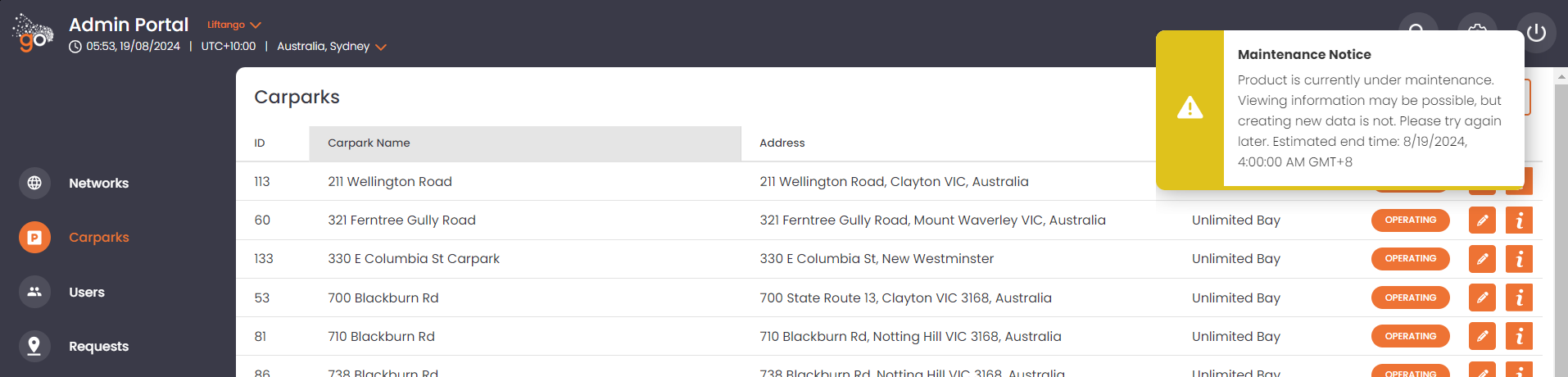
During this period, the Admin portal user:
- will be able to view and list information available in the portal i.e. user, carpool requests, allocations, etc.
- will NOT be able to update, add, or remove any information.
Clicking the message would remove it from the user's view. Refreshing the page will show the message again if the system is still under maintenance.
If there are any inquiries, questions, or suggestions, please don't hesitate to send us an email at support@liftango.com. Thank you!
Was this article helpful?
That’s Great!
Thank you for your feedback
Sorry! We couldn't be helpful
Thank you for your feedback
Feedback sent
We appreciate your effort and will try to fix the article